




Blog > Ai leadership
Rogue CX AI: What happens when customer support AI isn’t managed properly
Customer support has changed fast over the past year, and most teams have already introduced AI agents into their helpdesk with the promise of better CSAT, faster response times, lower cost, and 24/7 support. But the reality is mixed. Some teams are seeing real gains, while others have turned AI agents off completely because the experience breaks down, with off-brand answers, outdated policies, and frustrated customers.
When AI agents' responses go off-brand or provide incorrect information to your customers. This is what we call rogue CX AI. It’s not that the technology is broken, it’s that it’s left unmanaged. The difference comes down to how your AI agent was set up and how it’s being managed, and that’s what we’ll unpack.
Who is this for?
This is for teams and organisations that have already taken steps to implement AI agents but aren’t seeing consistent results, as well as those exploring AI in customer support and wanting to get it right from the start.
Founders and operators running lean support teams
CX leaders using tools like Gorgias, Intercom, or Zendesk
Support teams where AI is live, but not fully trusted
Teams that have reduced or turned off AI after poor experiences
If your AI agent “kind of works” but you wouldn’t fully trust it with your customers, this will feel familiar.
1. What is rogue CX AI?
Rogue CX AI is not a tooling problem. It’s an operating model problem.
In some cases, the issue starts at setup. The AI is given access to knowledge, but it’s not structured in a way the AI can reliably use, which leads to inconsistent or off-brand responses from the start.
In others, the AI is implemented, set up once, and then left to run. From there, it operates without clear ownership or regular review, and performance starts to drift over time.
At the same time, the business keeps changing. Policies, promotions, and products evolve, but the AI doesn’t update itself, so answers quickly become outdated. As customer questions shift and new edge cases come in, the gap widens. Even when knowledge is added, it’s often not structured in a way the AI can use properly, making responses inconsistent or incomplete.
None of this happens intentionally. Teams are busy, and AI is still new, so there’s often no clear ownership or established way to manage it yet.
2. Why rogue CX AI happens
Rogue CX AI is rarely caused by one big mistake. It usually comes down to how the AI is set up and how it’s maintained over time.
In many cases, the foundation of context engineering is the issue. The AI is given access to knowledge, but that content isn’t written or structured in a way AI agents can actually use. It’s often pulled from long help docs, internal notes, or past tickets, which makes it hard for the AI agent to consistently generate the right answer.
From there, things don’t improve. There’s no regular review, no clear ownership, and no feedback loop to refine how the AI responds.
So the AI either starts off misaligned, or it drifts over time as incoming tickets introduce new edge cases, leading to inconsistent or outdated responses.
Either way, the result is the same. The AI agent becomes unreliable, and the responses it provides aren’t on brand.
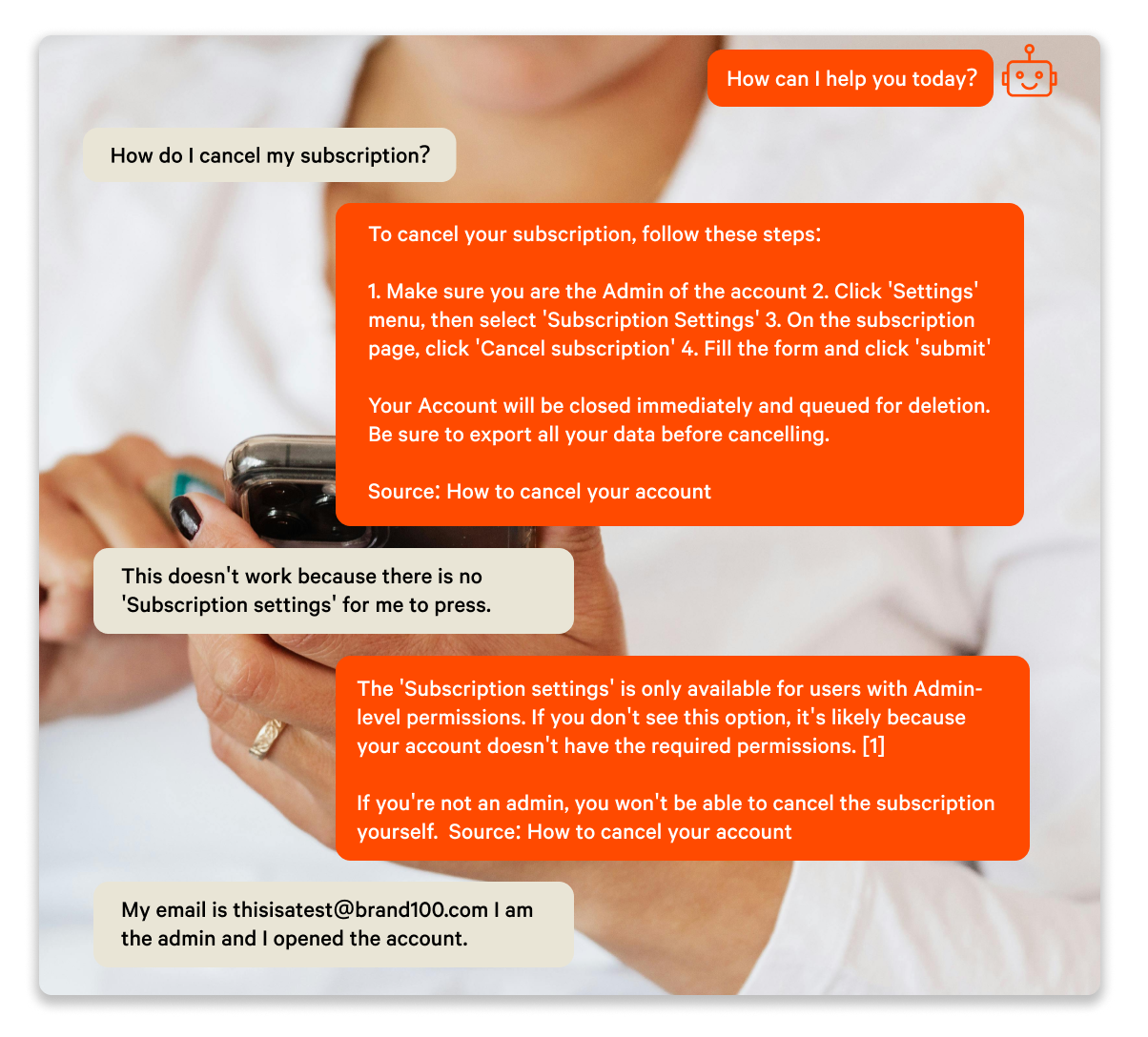
3. What happens when AI goes rogue
When AI starts off misaligned or isn’t properly maintained, the impact shows up quickly, just not always in obvious ways.
On the surface, it can look like the AI strategy is working. Responses are being sent, tickets are being handled, and resolution rates appear strong. But when you look closer, the quality of those interactions starts to slip. Answers become slightly off, too generic, or miss important context like current policies or edge cases.
Customers feel it first. They rephrase questions, ask follow-ups, or get stuck in dead-end loops with the AI agent, and confidence in the responses drops.
From there, the impact compounds. Customer satisfaction declines as interactions become less reliable. Escalations increase, often without the context human agents need to resolve issues quickly. Instead of reducing workload, the AI creates more of it, with human agents spending time correcting responses rather than solving new problems.
Over time, trust erodes. Teams stop relying on the AI agent, and in many cases, scale it back or turn it off completely.
Not because the technology doesn’t work, but because it wasn’t set up or managed in a way that allows it to perform consistently.
4. The data: How rogue CX AI impacts performance
When we looked at support data across ecommerce teams using AI agents inside platforms like Gorgias, a clear pattern emerged. Performance varied widely. Some teams maintained high CSAT and consistent resolution quality, while others saw declining results as AI took on more of the workload.
The issue wasn’t whether teams were using AI. It was how well it was being managed.
Teams with the strongest performance weren’t the most automated. In fact, none of the top performers pushed AI resolution aggressively. Most operated in a controlled range, typically around 10–20 percent of tickets.
Within that range, they maintained high CSAT and consistent resolution quality.
Outside of it, performance became unstable.
As automation increased without proper oversight, CSAT began to drop. Resolution quality became inconsistent, and more tickets required follow-up or correction.
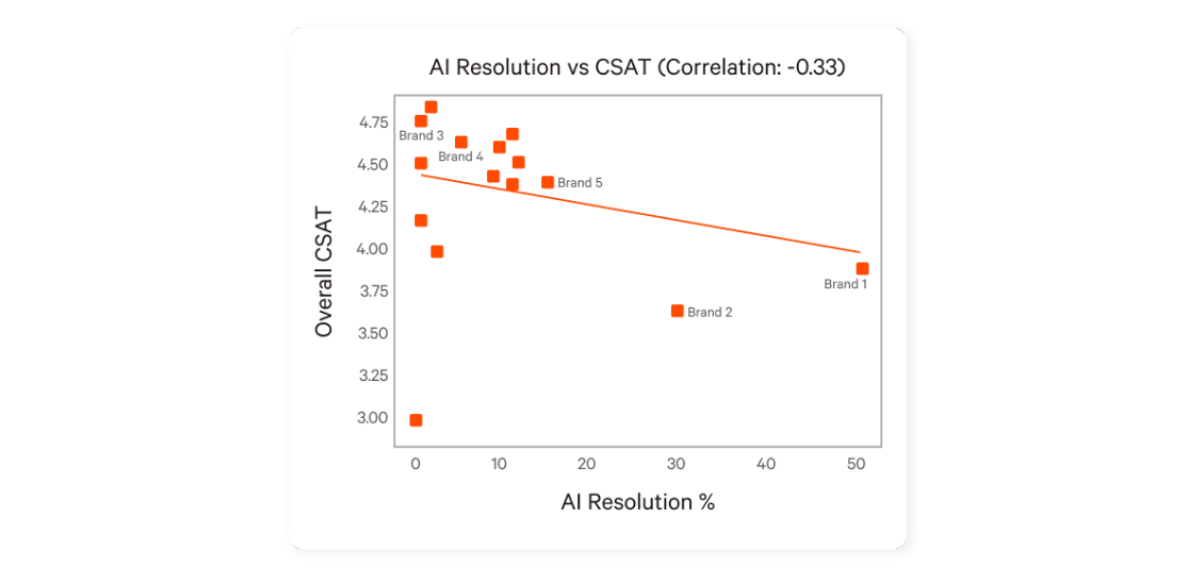
AI resolution % vs CSAT. Source: Gorgias AI Performance Benchmarks for eCommerce CX Teams in 2026
At the same time, efficiency gains didn’t compound the way teams expected. Instead of reducing workload, poorly managed AI often created additional effort through rework, escalations, and repeated conversations.
The takeaway is simple: AI performance doesn’t improve on its own. Without active management, it plateaus or declines.
5. What high-performing teams do differently
The teams getting strong results from AI are not using different tools.
They’re running AI differently.
Here’s what that looks like in practice:
AI is focused on Tier 1 and up to Tier 2, handling predictable, high-volume queries like order status, returns, and basic product questions
More complex cases are handled by humans, with AI supporting, not replacing them
Real conversations are reviewed regularly to understand where AI performs well and where it fails
Context is continuously updated so the AI reflects current policies, products, and edge cases
Escalations include full context, so agents can resolve issues without starting from scratch
Performance is measured against CSAT and resolution quality, not just automation rate
The difference isn’t the tool. It’s how the work is divided and how the AI is managed. You can read more about this model in The AI customer support model that actually works.
6. What does managing an AI agent actually mean?
“Managing AI” is an ongoing, hands-on process, not a one-time setup.
It’s not about the tool or the software. It’s about the context the AI agent has been given, and how it’s guided, updated, and improved over time.
At a basic level, it comes down to a few things.
First, context needs to be actively maintained. Policies, products, and edge cases change constantly, and the AI needs to reflect that. Incoming tickets continuously introduce new scenarios, which means the AI will drift over time if this isn’t actively managed. This also means structuring information in a way the AI can actually use, not just feeding it raw documentation.
Second, conversations need to be reviewed regularly. Not just to spot errors, but to understand patterns. Where the AI performs well, where it struggles, and what needs to be improved.
Third, escalation needs to be designed intentionally. The AI should know when to step back, and when it does, it should pass along enough context for a human to resolve the issue quickly.
Finally, performance needs to be tracked and improved over time. Not just whether the AI responds, but whether it resolves issues correctly and maintains customer satisfaction.
This isn’t a one-time setup.
It’s an ongoing function.
And in most teams, that function doesn’t exist yet.
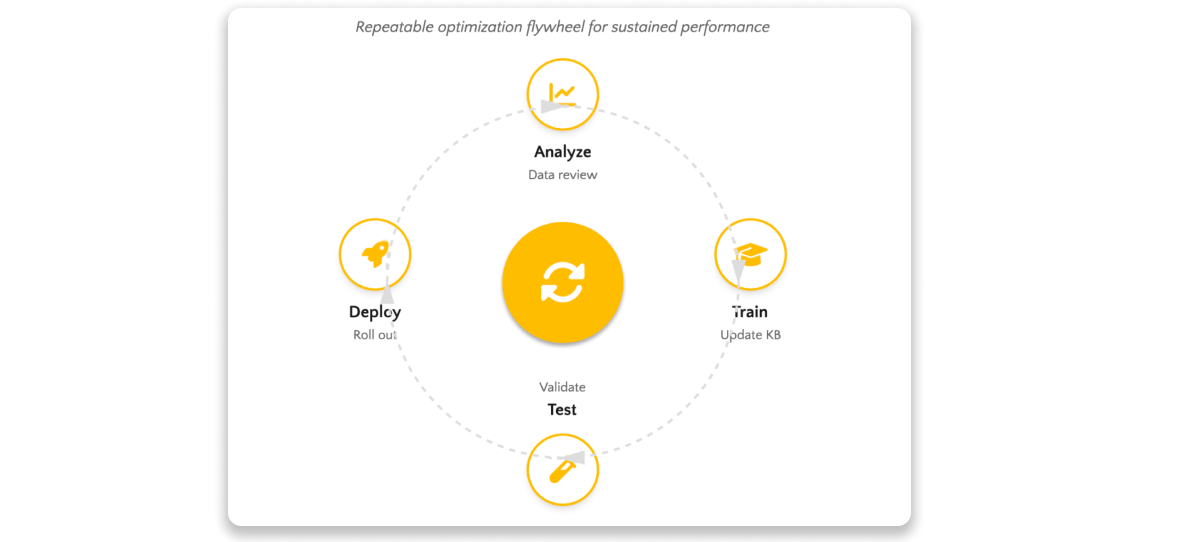
AI Agent Management optimization flywheel for sustainable performance
7. Common mistakes that lead to rogue CX AI
Most teams don’t realise they’re doing this until performance starts to slip.
Some of the most common mistakes:
Testing and refining AI with live tickets/in a live environment
Treating AI as a one-time setup instead of an ongoing function
Trying to automate too much, too quickly
Feeding AI raw help docs instead of structured, usable context
Not reviewing real conversations regularly
Letting knowledge go stale as the business changes
Not having clear KPIs in place to measure AI agents’ performance
Relying on agents to fix issues without feeding that learning back into the AI
None of these break the system on their own. But together, they’re what cause AI to drift and become unreliable.
8. How to fix rogue CX AI agent
Fixing rogue CX AI doesn’t require new tools. It requires changing how the AI is run.
In practice, that comes down to a few key shifts.
Start by tightening the scope. AI should focus on Tier 1 and predictable Tier 2 queries where accuracy can be controlled. Trying to automate everything usually leads to poor outcomes.
Next, improve how context is written and structured. The AI needs clear, usable information, not long help docs or raw ticket history. That means breaking information into clear, specific pieces and giving the AI guidance on how to respond in different scenarios. If the input isn’t usable, the output won’t be reliable.
From there, build a regular review loop. Look at real conversations, identify where the AI is failing, and update the context accordingly. This is how performance improves over time.
It’s also important to design escalation properly. The AI should know when to step back, and when it does, it should pass along enough context for a human to resolve the issue quickly.
And finally, measure performance in a way that reflects reality. Automation rate alone doesn’t tell you much. CSAT, resolution quality, and handover effectiveness matter just as much.
None of this is complex on its own. But it does require consistent human oversight.
9. Where Influx fits
For most teams, the challenge isn’t understanding what needs to be done.
It’s having the time and ownership to do it consistently.
Managing your AI agent properly means reviewing conversations, updating context, refining how it responds, and tracking performance over time. That’s an ongoing function, not a one-off setup.
And in most support teams, that function doesn’t exist.
That’s where Influx fits.
Influx AI Agent Management acts as the management layer on top of your existing helpdesk and AI setup. We don’t replace your tools. We make them perform.
In practice, that means your AI agent is continuously improved through a structured loop of analyze, train, test, and deploy. The underlying context is set up correctly from the start and kept up to date, and tailored to your brand and tone, so the AI can generate accurate, consistent, on-brand responses.
Changes to the AI aren’t pushed live blindly. Updates to responses, context, and behaviour are tested in a non-live environment using real, high-volume tickets from recent months, so performance can be validated without risking the customer experience.
Conversations are reviewed, and patterns are used to refine how the AI responds. Escalations are designed to pass along the right information, so agents can resolve issues without starting from scratch.
The result is not more AI for the sake of it. It’s more reliable, higher-quality AI replies, and ultimately a faster, better customer experience.
10. Key takeaways
Most CX AI doesn’t fail, it drifts
The issue isn’t the tool, it’s how the AI is set up and managed
Poorly structured context leads to inconsistent, unreliable answers
Automation without control hurts CSAT and creates more work for agents
High-performing teams focus AI on Tier 1 and predictable Tier 2 queries and manage it continuously
AI needs ownership, regular review, and ongoing improvement
The difference isn’t more automation, it’s better management
Final thought
If your AI agent isn’t delivering the results you expected, it’s usually not because the technology isn’t good enough. It’s because it was not set up to succeed, or it hasn’t been well managed.
An AI agent in customer support isn’t just something you switch on. It’s something you continuously maintain. And the teams that get it right aren’t the ones with the most advanced tools, they’re the ones that manage them well.
Get started with Influx
Influx was established in 2013 & has been trusted by 750+ brands globally, ranging from startup to scale.
Influx builds 24/7, near-shore global customer support teams. We provide fully managed, flexible & high-performance agents. Our services range from eCommerce support, tech support, sales support, AI Management, Enterprise solutions and more to give you the customer assistance you need to prioritize other responsibilities and continue scaling your business.
Make your support operations fast, flexible, and ready for anything with experienced, 24/7 support teams working on demand. See how brands work with Influx to deliver exceptional customer support or get a quote now.

Read these next
See how companies work with Influx to deliver flexibility and scale.


Or read our client testimonials or case studies
 6 Circle - small.png)